 See why a payment failed, and tell your buyer how to fix it.
Every failed payment in your marketplace has a row on the Failed Charges tab. For Stripe and SamPay payments, each row tells you in plain language why the payment failed and what the buyer can do next, so you can reach out and save the sale.
Find your failed charges
Go to Orders and click the Failed Charges tab. The banner at the top of the Orders page also shows how many failed charges you've had in the last 7 days.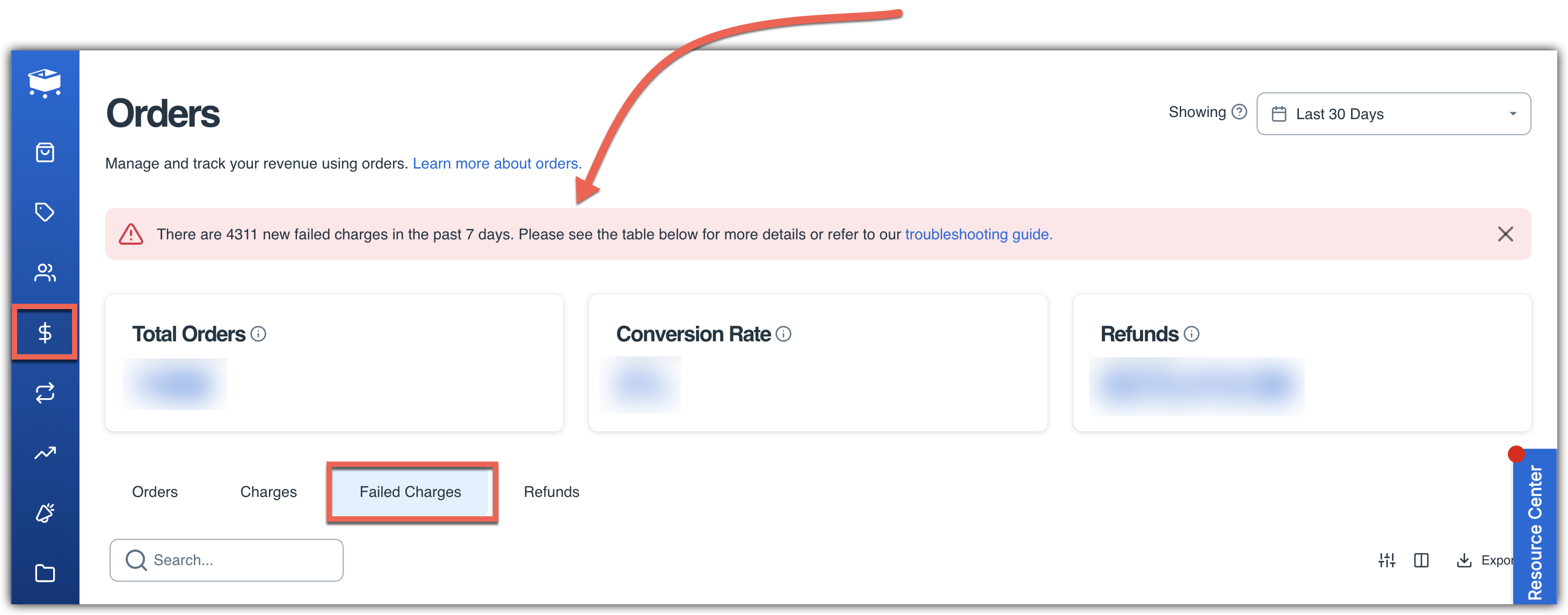
Each row shows:
- Failure Date - when the payment failed. If the buyer tried more than once at checkout, the attempts are grouped into one row, with a line such as "4 attempts in 6 minutes" under the date.
- Customer - the buyer's name and email. If the buyer didn't enter them, you'll see "Not entered".
- Charge Type - One Time for checkouts and upsells, Recurring for subscription renewals.
- Product - what the buyer was paying for.
- Charge Source - the card brand and last 4 digits. Payments without a card, such as PayPal, show the payment method instead.
- Why it failed - the reason, with the next step for the buyer underneath.
- Charge Total - the amount. A $0 free-trial sign-up is marked "Free trial".
- Bought later - if the buyer came back and paid, a link to that order. No link means they haven't bought since, so they're worth following up with.
Use the filters to show only One Time or Recurring charges, or a single charge source. Search to find a specific customer's failed charges.
Why a payment failed
Click the reason in the Why it failed column to open the details. You'll see the reason, the next step for the buyer, and the original message from the payment processor.
| Why it failed | Next step for the buyer |
|---|---|
| Not enough money on the card | Use another card, or add money to the account. |
| The card has expired | Use a card that has not expired. |
| Wrong security code | Enter the security code again. |
| Wrong card number, expiry date or ZIP code | Check the card details and try again. |
| The card cannot be used for this purchase | Use another card, or ask the bank to allow this type of purchase. |
| The payment processor had a problem | Try again in a few minutes. |
| The bank declined the card and did not give a reason | Call the bank, or use another card. |
| Stripe blocked the payment as possible fraud | Use another card. |
| Other | Depends on the cause - open the details to see what happened. |
Other covers failures that aren't card declines: the buyer canceled their PayPal agreement or recurring payment, the buyer didn't complete an upsell payment, or your payment processor didn't accept SamCart's connection details. If it's the last one, check your processor settings - buyers can't pay until that's fixed.
Failed subscription renewals
Renewal failures also appear on the subscription itself. Click Subscriptions in the left-hand menu, find the customer's subscription and click its Subscription ID.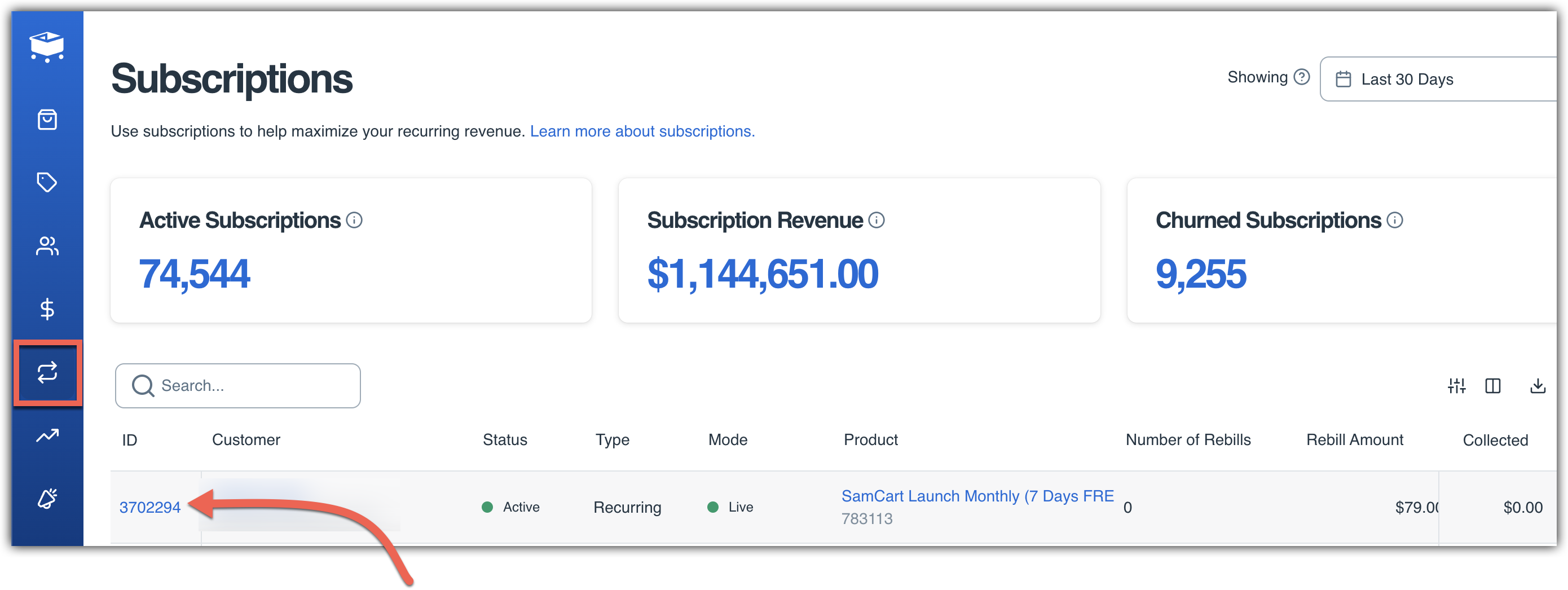
Scroll to the Failed Charge Summary at the bottom of the page. Each failed renewal shows the Charge Date, the Amount and Why it failed, including the bank's reason for Stripe and SamPay renewals. Click the reason for the full details.
To retry failed renewals and email buyers automatically, see Subscription Saver (Dunning).
Which processors this covers
Reasons and full checkout visibility are for Stripe and SamPay. Every failed Stripe or SamPay checkout gets a row, including declines that happened before an order was created.
With Authorize.net, EasyPayDirect, PayPal and Braintree, the card is checked before an order exists, so a card declined at that point doesn't appear on the Failed Charges tab. For more detail on any failure, look the payment up in your processor's dashboard.
Look up a failure in Stripe
For Stripe or SamPay payments, you can see more in your Stripe Dashboard. Log in to Stripe and open Transactions. Failed payments have a Failed tag - hover over it for more information, or click the payment to see its timeline. Search for a customer to see all their failed payments.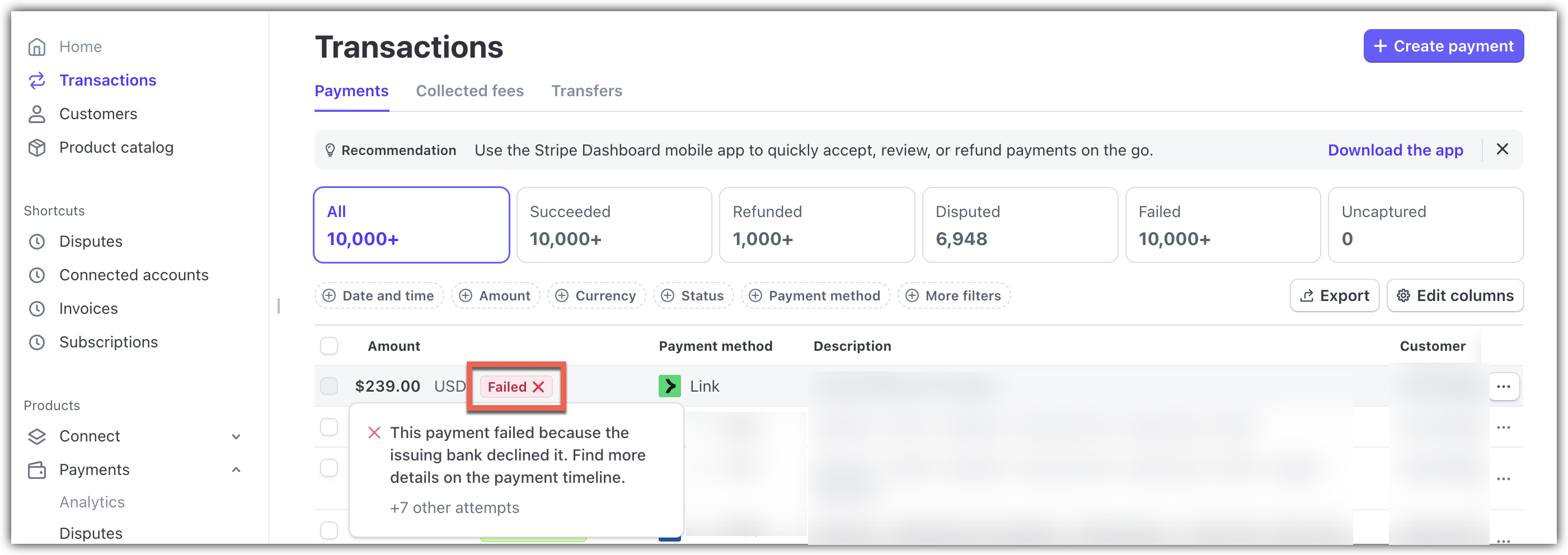
Stripe's guides to declines and decline codes explain each code in more depth.
Help your buyer complete the purchase
Send the buyer the next step shown in Why it failed. If there's no specific reason, these usually work:
- Refresh the checkout page and re-enter the card details carefully.
- Try a different card.
- Call the bank and ask them to approve the purchase.
SamCart passes the buyer's details to your payment processor, and the processor or the buyer's bank decides whether the payment goes through.
Frequently Asked Questions
Why do I see more failed charges than before?
Failed Stripe and SamPay checkouts that happened before an order was created used to be hidden. They now have a row, so you may see more rows even though fewer payments are being declined. Retries at checkout are grouped into one row, which keeps the list shorter.
Why do some failed charges say "Other"?
The failure wasn't a card decline. Click it to see what happened - for example a canceled PayPal agreement or a payment processor connection problem.
Can I export failed charges?
Yes. The export has one row per attempt, with the card brand, why it failed, the processor's error message and the bought-later order number.
A buyer's card was declined with PayPal, Authorize.net, EasyPayDirect or Braintree. Why isn't it listed?
These processors check the card before an order exists, so that decline never reaches SamCart. Check your processor's dashboard instead.