
SamCart's Public API lets you connect your order, subscription, customer, and charge data to the tools you already use.
SamCart's Public API lets you connect your order, subscription, customer, and charge data to your own applications, and take actions like canceling subscriptions, issuing refunds, and adding products to existing orders.
This article covers creating a key, choosing its permissions, and managing keys across your account. For endpoints, request and response schemas, and the changelog, see the the SamCart Developer Docs.
Where to Create Your API Key
There are two places to create a key, depending on your role. Both create the same kind of key.
Any user — your own keys
- Click your profile icon (top right)
- Go to User Profile
- Select API Keys
- Click to generate a new key, name it, and choose its permissions
Admins — your keys plus everyone else's
- Click your profile icon (top right)
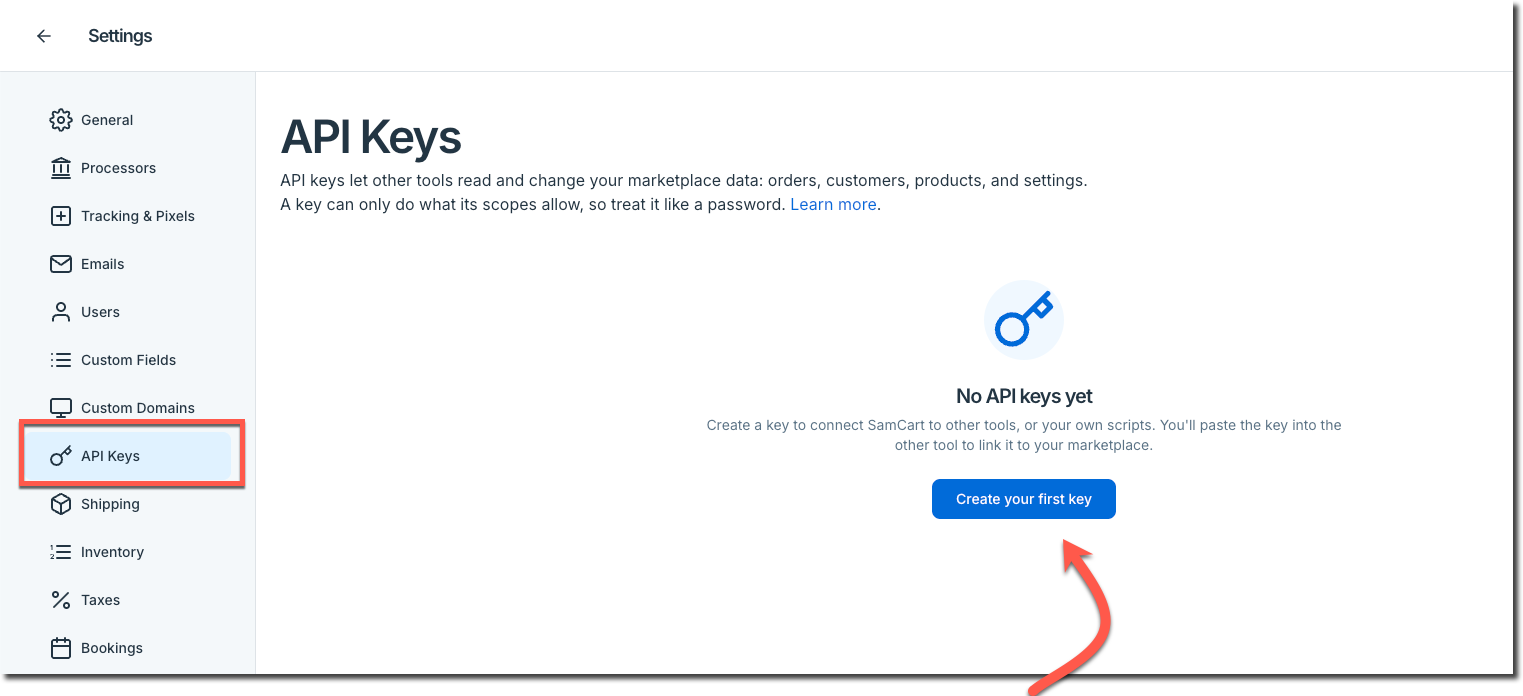
- Go to Settings
- Select API Keys
- Click to generate a new key, name it, and choose its permissions
The admin page is both a creation page and a management page — it lists every key on the account, not just your own.
What Your Key Can Access
A key can never do more than the person who created it. Its permissions are capped by your user role — whatever your role lets you do in SamCart, your key can do through the API, and nothing beyond it.
When you create a key, you choose one of three access levels:
- Read only — the key can view data but cannot make changes
- Full access — the key can do everything your role allows
- Custom — you pick individual permissions from the list below
The Custom permissions you can check are:
Read
- View charges
- View customers
- View orders
- View products
- View subscriptions
- View funnels
- View upsells
Write
- Create and update orders
- Manage subscriptions
- Issue refunds
For exactly which API endpoints each permission covers, see the Developer Docs.
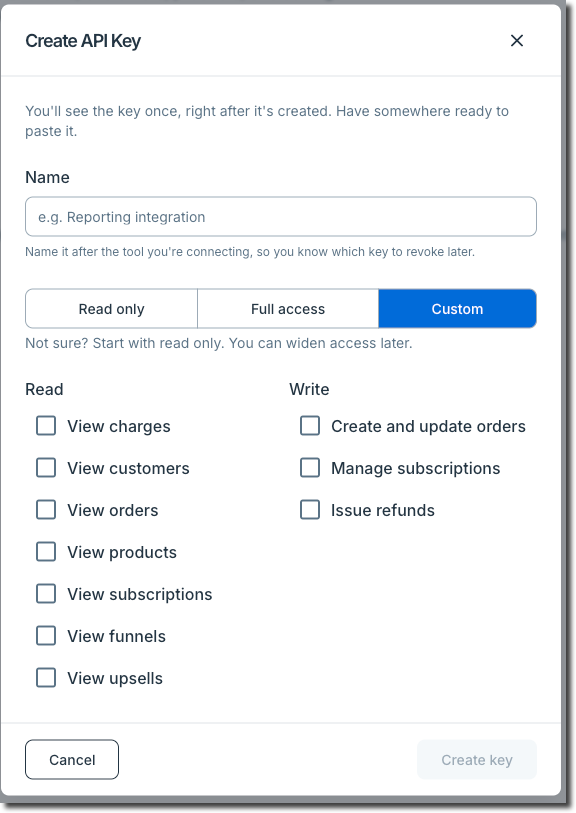
Copy your key somewhere safe when you create it. Anyone holding the key can act with your level of access.
Managing API Keys
- Admins can see every key created on the account, and can edit a key's permissions or revoke it entirely.
- Non-admin users see only their own keys, and can edit or revoke those.
- The Account Owner's keys are the exception — only the Account Owner can manage them, even from the admin page.
Revoking a key takes effect immediately. Any application still using that key will start receiving authentication errors right away, so swap in a replacement key before revoking the old one.
Tracking Key Activity
Every API key action — creation, permission change, and revocation — is recorded in your account's Audit Log, so you can see who did what and when.
SamCart also sends an email whenever a key is created, edited, or has its permissions changed. These emails are controlled by the security notifications toggle in your notification settings, so turn that on if you want them.
Authenticating Your Requests
Pass your key on every request using the sc-api header, along with Accept: application/json.
All requests must use HTTPS — plain HTTP requests are redirected (301). Full authentication details are in the Developer Docs.
Rate Limits and Pagination
- Rate limiting — the API is rate limited. If you exceed it you'll get a 429 response with a retry-after header telling you how long to wait before retrying.
- Pagination — list endpoints are offset-based and return a maximum of 100 results per page. Page through the offsets to pull a full data set.
Frequently Asked Questions
Q: How does it work?
A: API users with a valid API token will be able to update Custom Fields on a single Order. To update a Custom Field, API users will need to specify which Order they would like to have updated and then supply the custom_field_slug and the custom_field_data on their API call. If successful, the API response will indicate that the value for the Custom Field was updated.

Q: Where do I find the custom_field_slug?
A: API users can find the slug for their Custom Fields within the /orders endpoint in the custom_fields object.

Q: What if my funnel has no orders, how will that appear in my API calls?
A: The API will return a successful response with an empty data array. This is normal for new funnels or funnels with no purchases yet!
Q: Can I combine date filters?
A: Yes. Use both created_at_min and created_at_max to query a specific date range, like "all orders from Funnel X in January 2026."
Q: Are deleted funnels/upsells still queryable?
A: Orders from deleted funnels or upsells are preserved in the system. However, the endpoint will return a 404 if the funnel/upsell record itself was deleted.
Q: Why am I seeing null for stripe_plan_id?
A: This field returns null for subscriptions that aren't connected to a Stripe plan, such as legacy or manually created subscriptions.
Q: Will the API Response Expansion affect my existing integration?
A: No. These are additive changes, your existing integration will continue to work exactly as before. The new fields are simply additional data in the response.